
How to Gift a Digital Game: Steam, PlayStation, Xbox and Nintendo Rules Compared
Your niece has a Nintendo Switch 2 and a wishlist, and you’ve got a week until her birthday. You open the eShop, find the game, and then you hit the question that stops most digital gifts: can you actually send it to her account, or do you need a code?
Steam and Xbox let you buy a specific game as a gift and send it straight to someone’s account or email. PlayStation’s official route is a PlayStation Store gift card, which Sony calls “the go-to way of gifting digital games.” Since November 16, 2026, Nintendo has let you gift games to members of your family group; outside a family group, it’s a Nintendo eShop card. On all four platforms, the recipient’s country decides whether the gift will work.
We checked each platform’s help pages and announcements on November 27, 2026. Here’s how gifting works on each one, and what changes when the person you’re buying for lives in another country.
How does digital game gifting compare across platforms?
Steam, Xbox and Nintendo let you pick the game, Nintendo only within a family group. PlayStation expects you to send credit or a code. The table sums up the official rules as of November 27, 2026.
| Platform | Gift a specific game? | How the gift arrives | Recipient in another country | Source |
|---|---|---|---|---|
| Steam | Yes, from the game’s page or a shared wishlist | In the friend’s Steam account, or by email with a sign-in link | Email gifts only within the same country; gifts to Steam friends in higher-priced regions are allowed, with the price matched to the friend’s region | Steam News, July 22, 2026 |
| Xbox | Yes, through “Buy as gift” | A message on the Xbox console and to the account email, with a code to redeem | The recipient must be in the same country as the buyer | Xbox Wire, December 5, 2025 |
| PlayStation | No direct game gifting; Sony points to gift cards | A digital voucher by email or a printable PDF, with a 12-digit code | The voucher must match the region of the recipient’s account | playstation.com, read November 27, 2026 |
| Nintendo | Yes, since November 16, 2026, but only to family group members | Straight to the recipient’s HOME Menu, ready to play | Game gifts only within the same Nintendo Account country; Nintendo eShop cards work only on accounts set to the card’s country | nintendo.com, read November 27, 2026 |
How do you gift a game on Steam?
On Steam, you buy the game as a gift from its page and choose a friend or an email address. Valve expanded gifting on July 22, 2026, so the rules are now looser than many older guides say.
Since that update, Steam gifting works like this:
- Guest checkout works for games. Someone without a Steam account can buy any game as a gift, for example from a wishlist link you’ve shared.
- Gifts can go to an email address. You don’t need to know the recipient’s account name. The email includes a link that lets them sign in and accept the gift.
- You don’t need to be Steam friends. Gifts can be sent straight from a shared wishlist.
- Cross-region gifts are possible. For a friend in a region where the game costs more, Steam matches the higher price at checkout, and that friend needs to be on your Steam friends list. Valve also says some gifts can’t be sent to other purchase regions because of price differences, and the game’s Steam page lists those territory restrictions.
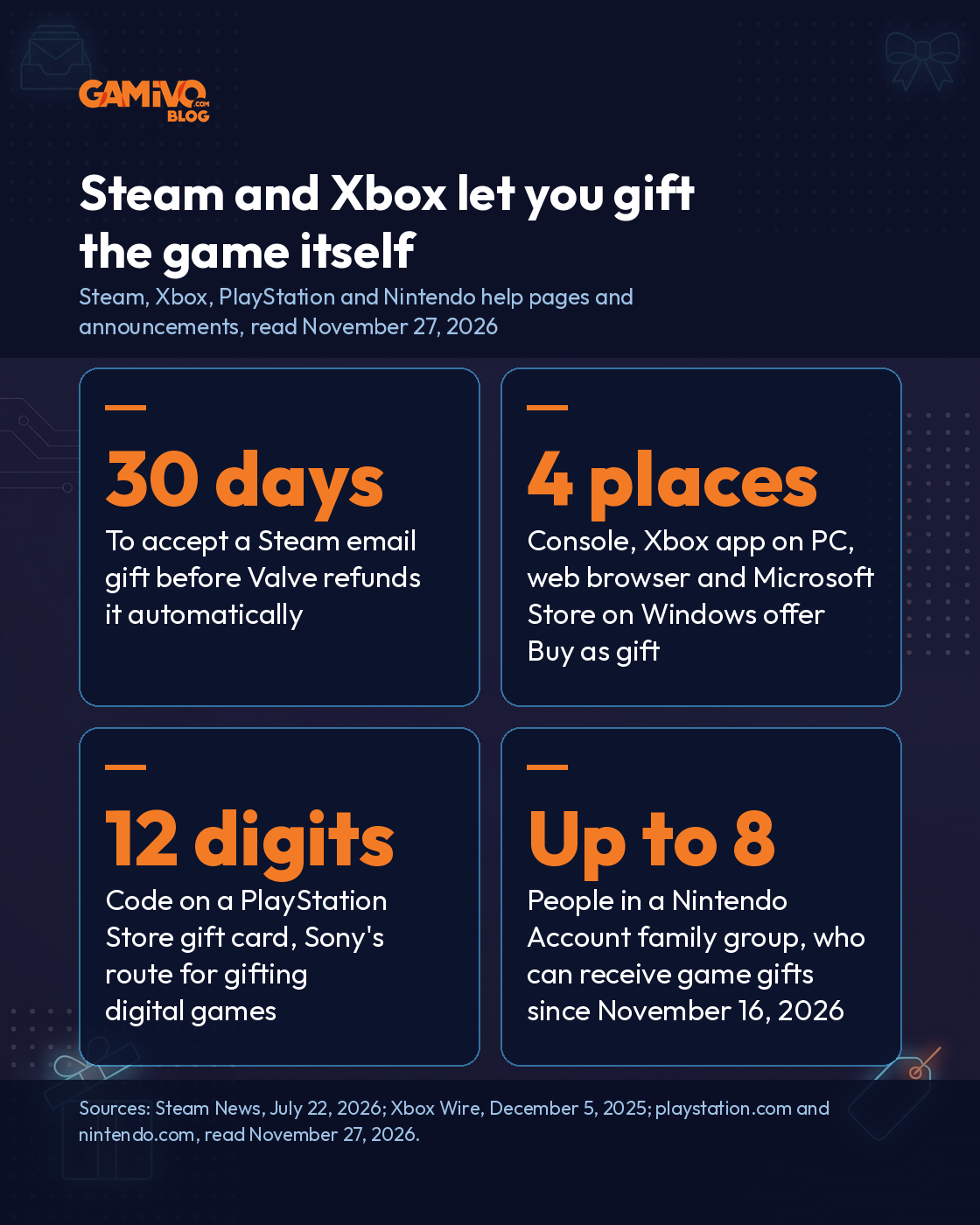
Email gifts come with two limits. Valve says an email gift that isn’t accepted within 30 days is refunded automatically, so you can’t schedule it for a later date. The second limit is location: “the recipient of the gift must also live in the same country as the purchaser.”
If you’d rather give money than a game, a Steam digital gift card goes into the friend’s Steam Wallet, and Valve says the card “will automatically be converted into your friend’s currency” when they live in another country. However, you can’t pay for a digital gift card with existing wallet funds. Our guide to Steam gift cards covers how the wallet works.
How do you gift a game on Xbox?
On Xbox, you find the game in the Microsoft Store and select the gift wrap icon, or “Buy as gift” from the “…” menu next to the buy button. According to Xbox Wire’s guide from December 5, 2025, the option works in four places:
- On the console, where you can send the gift to someone on your friends list or to an email address.
- In the Xbox app on PC, including the ROG Xbox Ally handhelds, with the same two options.
- In a web browser, through the Xbox Store online or Microsoft Store online, by email only.
- In the Microsoft Store on Windows, also by email only.
After that, the recipient gets a message on their console and at the email linked to their Xbox account, and then selects “Redeem code.” You can also gift add-ons and subscriptions this way, including Xbox Game Pass Ultimate. The rule Xbox spells out is about location: “Make sure the person receiving the gift is in the same country as you.”
Can you gift a game on PlayStation?
PlayStation doesn’t offer a “buy as gift” button for a specific game. Sony’s own FAQ answers the question directly: “PlayStation Store gift cards are the go-to way of gifting digital games on PS5, PS5 Pro and PS4.”
A PlayStation Store gift card can be sent as a digital voucher by email or printed as a PDF, and the recipient enters the 12-digit code under Redeem Code on a PS5, a PS4, the PlayStation App or a web browser. Sony lists games, add-ons, PlayStation Plus memberships, virtual currency such as V-Bucks and digital pre-orders among the things the credit can pay for.
The region rule is strict. PlayStation’s support page says “the voucher code needs to be for the same region as your account,” and that funds and content can’t be moved between accounts. A US voucher won’t redeem on a UK account, so check which region your recipient’s account uses before you buy. If you’re buying for a PS5 owner, our guide on where to buy PS5 game codes cheap explains how PSN regions work.
Can you gift a game on Nintendo Switch and Switch 2?
Since November 16, 2026, you can gift a digital game on Nintendo Switch or Nintendo Switch 2, but only to someone in your Nintendo Account family group. The feature needs system version 23.5.0 or later, which Nintendo released on November 9, 2026.
Nintendo’s US announcement and its UK page on digital games set these terms:
- Who can receive: members of your family group, which holds up to 8 people, as long as they’re in the same Nintendo Account country as you.
- What you can send: eligible games, DLC and upgrade packs bought in Nintendo eShop on your device.
- How to send: tick Give as a Gift on the product page, pick the family member and the system to send to, then pay as usual.
- When it arrives: immediately, on the recipient’s HOME Menu, where they can accept it and play right away.
There are limits, though. Supervised child accounts can’t send gifts, and Nintendo caps the number of gift purchases in a given period. The UK page lists what you can’t gift: a game the recipient already owns, a pre-order, a game rated above what the recipient’s account settings allow, or a game rated PEGI 18. Your recipient also has to have opened Nintendo eShop on their console before, or Nintendo can’t deliver the gift.
Outside a family group, the gift is a Nintendo eShop card. Nintendo says the cards “are compatible only for the Nintendo eShop country or region where they were intended to be sold,” and it won’t exchange or refund a card bought for the wrong country.
What if the person you’re buying for lives in another country?
The recipient’s account country matters more than where you live. Each platform has its own rule:
| Platform | What happens across borders |
|---|---|
| Steam | Email gifts stay within your country. A gift to a Steam friend in a region where the game costs more goes through at that higher price, unless the game’s Steam page lists a territory restriction. A Steam digital gift card converts to the friend’s currency. |
| Xbox | Game gifts need the recipient in the same country. Microsoft’s gift card terms add that a balance in one currency can only be added to an account registered where that currency is official. |
| PlayStation | Vouchers redeem only on accounts from the same region as the code. |
| Nintendo | A game gift goes only to a family group member in the same Nintendo Account country. Nintendo eShop cards redeem only on accounts and systems set to the card’s country or region. |
So before you send a Steam game to a friend abroad, check that it costs more in their region and that its Steam page shows no territory restriction. On consoles, buy a code or gift card issued for the country of your friend’s account, not your own.
Where to buy digital game codes and gift cards for a present
You can buy them from each platform directly or from a site that offers codes for several platforms at once. GAMIVO customers can buy gift cards for PSN, Xbox, Steam and Nintendo to cover friends on different consoles.
Whatever you choose, check three things before you pay:
- The recipient’s platform. A PSN card won’t help someone who plays on Switch.
- The account country. Match the card’s region to the account, not to your own address.
- What they’ll spend it on. A specific game suits a known wishlist; credit suits someone whose library you don’t know.
Our guide on where to buy digital game codes explains the difference between a game code and a gift card, and how regions and currencies affect both.
Frequently asked questions
PlayStation, Steam and Nintendo
PlayStation doesn’t let you send a specific game to another account as a gift. Sony’s FAQ says PlayStation Store gift cards are “the go-to way of gifting digital games on PS5, PS5 Pro and PS4.” The recipient redeems the 12-digit code on an account from the same region as the card.
Yes, if they’re on your Steam friends list and the game costs more in their region. Since July 22, 2026, Steam matches that higher price at checkout. Some games can’t be gifted to other regions at all, and the game’s Steam page says so. Gifts sent by email are different: Valve says the recipient must live in the same country as the buyer.
Yes. Since November 16, 2026, you can send games to members of your Nintendo Account family group in the same Nintendo Account country, on systems running version 23.5.0 or later. The gift arrives on the recipient’s HOME Menu immediately. Outside a family group, a Nintendo eShop card for the recipient’s country is the alternative.
Xbox and gift cards
Open the game in the Xbox Store online or Microsoft Store online, choose “Buy as gift” from the “…” menu, enter the recipient’s email and pay. They’ll get a code to redeem. Xbox says the recipient must be in the same country as you.
You can buy gaming gift cards from Steam, PlayStation, Microsoft and Nintendo directly, or from sites that offer codes for several platforms. GAMIVO offers PSN, Xbox, Steam and Nintendo gift cards. Whichever you pick, match the card’s region to the country of the recipient’s account.


GTA Games in Order: The Complete History of Grand Theft Auto
Find out how Grand Theft Auto grew from a 1997 top-down crime game into one of the best-selling franchises ever made. This guide lists all GTA games in order of release and recaps each one: the story, the gameplay, and its impact on the industry.
Game Keys for Steam Deck and Windows Handhelds: What Activates Where
The best site to buy game keys online for a Steam Deck or ROG Xbox Ally shows the activation platform up front. See which keys work on each handheld and why.
Petit Planet Release Date, Platforms, and Gacha System: Everything You Need to Know
The wait for HoYoverse’s biggest departure from combat-focused RPGs is nearly over. With the global Petit Planet release date, the creators of Genshin Impact and Honkai: Star Rail are introducing a warm, community-driven life simulation.